Define Forbidden Topics
DealDroid gives you full control over what your AI Sales Agent can and cannot talk about. This is essential for keeping your brand safe, professional, and compliant.
Whether it’s legal, sensitive, or simply off-brand — you can define what topics should trigger a handover or stop the chat completely.
Why It Matters
Section titled “Why It Matters”- 🛡 Avoid legal or compliance issues — Keep your business protected
- 🤖 Prevent the AI from guessing or hallucinating responses — Ensure accuracy and reliability
- 💬 Protect your brand tone and customer experience — Maintain consistency and professionalism
- 🎯 Control when humans step in — Preserve your unique sales process and customer relationships
Why Every Business Needs Different Settings
Section titled “Why Every Business Needs Different Settings”There are no default forbidden topics — because every business is different.
What’s acceptable for one store might be off-limits for another. For example:
- Some stores don’t want the bot to handle price negotiations — they prefer a human salesperson to close the deal
- Some businesses want the AI to stop at checkout — letting a real person guide the final purchase steps
- Other stores may restrict refund or complaint discussions — ensuring sensitive issues get personal attention
- Legal or medical businesses may need to block advice-giving — to stay compliant with regulations
That’s why DealDroid lets you decide which topics your AI should avoid based on your business strategy, industry, and customer expectations.
Step 1: Define Forbidden Topics
Section titled “Step 1: Define Forbidden Topics”Navigate to Automation in the Advanced Settings menu. Here you can configure which topics your Droid should avoid.
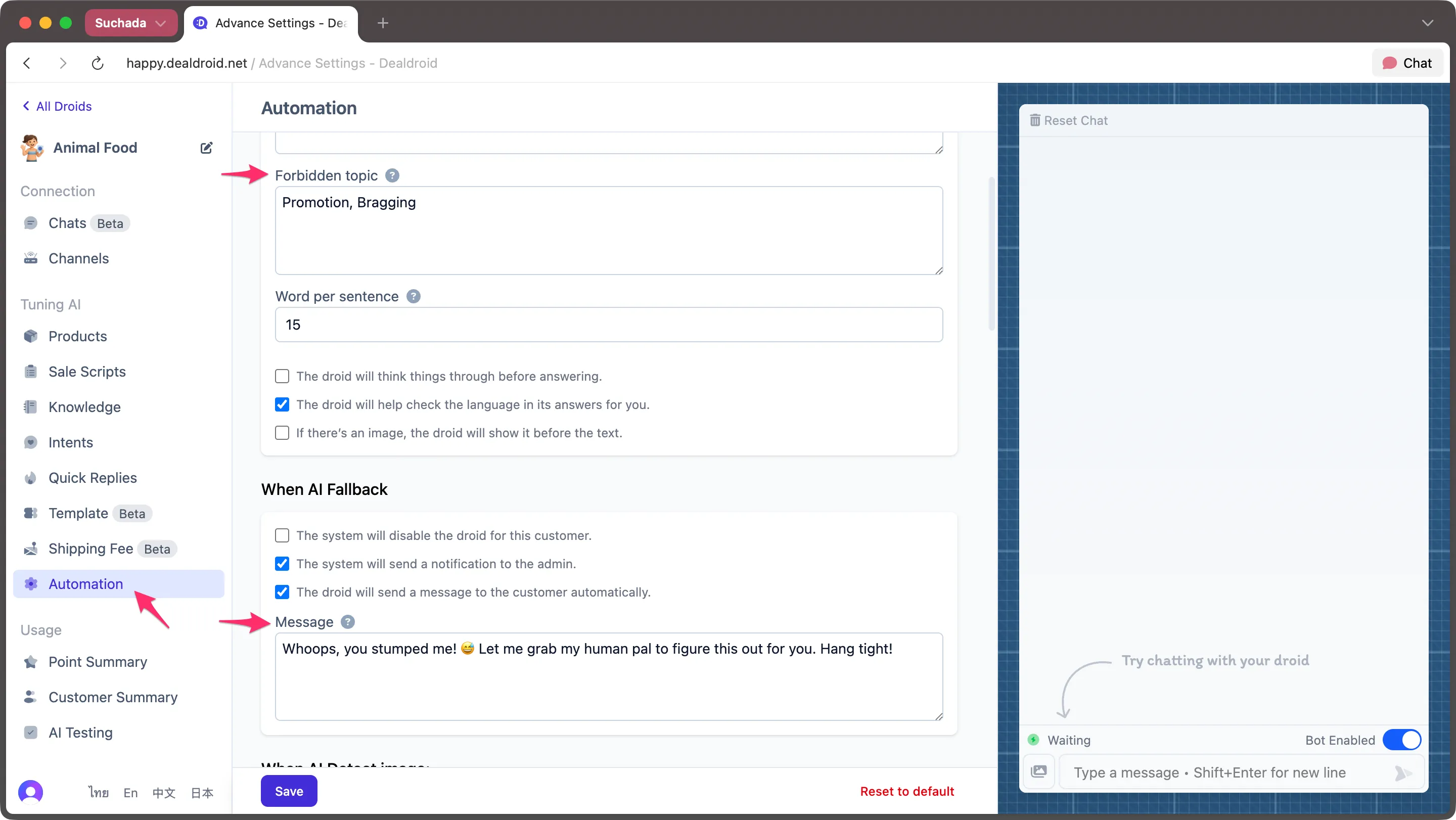
You can list specific:
- Keywords or phrases (e.g., “discount”, “refund scam”, “lawsuit”, “price negotiation”)
- Topics you don’t want the bot to discuss (e.g., legal disputes, competitor comparisons, final checkout steps)
- Triggers like sensitive words, emojis, or specific user intents
Real-World Examples
Section titled “Real-World Examples”E-commerce Store: Add “discount code” or “negotiate price” if you want a human to handle special pricing discussions.
Hotel Business: Add “payment” or “checkout” so your staff can personally confirm bookings and process payments.
Professional Services: Add “legal advice” or “medical recommendation” to ensure compliance and avoid liability.
Remember: What you restrict depends entirely on your business model and sales strategy. There’s no one-size-fits-all approach.
Step 2: Customize Your Fallback Message
Section titled “Step 2: Customize Your Fallback Message”When DealDroid encounters a forbidden topic, it will automatically stop responding and send a pre-configured message to the customer.
In the “When AI Fallback” section (shown in the screenshot above under “Message”), you can write a custom message that:
- 💬 Lets the customer know they’ll be helped — reassures them their message was received
- 👤 Notifies them a human will take over — sets the right expectation
- 🎨 Matches your brand voice — keeps the tone consistent with your business style
Example Fallback Messages
Section titled “Example Fallback Messages”Friendly & Casual:
“Whoops, you stumped me! 😅 Let me grab my human pal to figure this out for you. Hang tight!”
Professional & Polite:
“Thank you for your message. I’ve flagged this for our team to review personally. Someone will be with you shortly.”
Direct & Clear:
“This requires human attention. Our support team has been notified and will respond soon.”
Choose a message style that fits your brand and helps maintain customer trust when the AI hands off the conversation.
Step 3: Test and Improve
Section titled “Step 3: Test and Improve”To make sure your forbidden topic settings work as expected:
- Use the chat preview panel on the right side of the settings page
- Type in a forbidden keyword or phrase
- Observe how the AI reacts (stops, escalates, or sends a fallback message)
This helps you:
- ✅ Confirm that DealDroid behaves correctly when hitting sensitive topics
- ✏️ Fine-tune the wording of your fallback messages
- 🔍 Identify additional triggers to include in your forbidden list
Best Practices
Section titled “Best Practices”Common Forbidden Topics to Consider
Section titled “Common Forbidden Topics to Consider”Depending on your business, you may want to restrict:
- Legal or compliance-related questions
- Competitor comparisons or negative reviews
- Financial or banking instructions
- Medical or health advice (if not licensed)
- Politically sensitive topics
- Personal data requests
Keep Your List Updated
Section titled “Keep Your List Updated”As you monitor conversations, you may discover new topics that should be restricted. Regularly review and update your forbidden topics list to improve your Droid’s safety and effectiveness.
You’re Always in Control
Section titled “You’re Always in Control”With DealDroid, you decide what your AI can discuss and when it should step back.
The AI knows what it’s allowed to say — and just as importantly, when it should say nothing at all.
This ensures your customers get the right help at the right time, while protecting your brand and business from unnecessary risks.
Need More Help?
Section titled “Need More Help?”Check out our step-by-step guide: