📄 Full API Reference
Detailed specifications for all 9 endpoints with complete request/response examples.
Need to send messages to your DealDroid bot from your own application? The Message Endpoint API lets you programmatically send messages on behalf of customers, allowing you to integrate DealDroid into your custom workflows, mobile apps, or third-party systems.
The Message Endpoint API allows you to:
All API endpoints are accessed through:
https://your-dealdroid.com/api/droids/:droidId/endpoint/Replace :droidId with your actual Droid ID (you can find this in your DealDroid dashboard).
All endpoints require a Bearer token in the Authorization header.
Example header:
Authorization: Bearer <your-token>Important: Keep your token secure and never expose it in client-side code or public repositories.
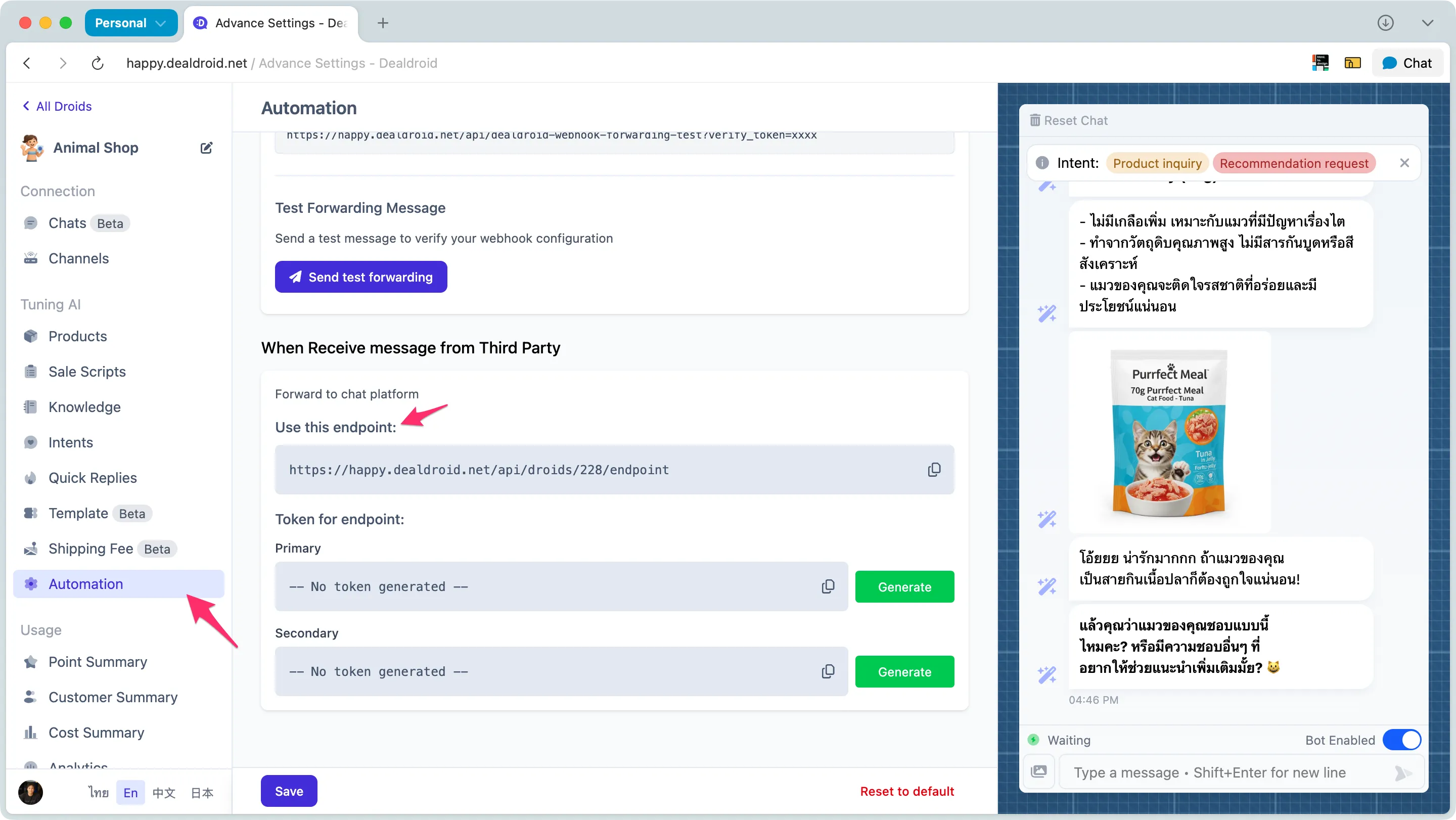
To obtain your API token:
If you need to generate a new token (e.g., for security reasons):
⚠️ Warning: Regenerating the token will immediately invalidate the old token. Make sure to update all applications using the API.
DealDroid provides 10 API endpoints to interact with your bot. Below is an overview of the available endpoints:
Retrieve the list of channels configured for your droid.
Endpoint: GET /api/droids/:droidId/endpoint/channels
Use case: Get information about all communication channels (LINE, Facebook, WhatsApp, etc.) connected to your bot.
Retrieve the conversation messages for a specific customer.
Endpoint: GET /api/droids/:droidId/endpoint/messages/:customerId
Use case: Display past conversations in your custom chat interface or for analytics purposes.
Get detailed information and configuration for a specific customer.
Endpoint: GET /api/droids/:droidId/endpoint/customer/:customerId
Use case: Retrieve customer profile data including name, contact info, language preference, and bot enabled status.
Example response includes: customerId, externalId, channelId, botEnabled, avatar, socialName, name, phone, address, city, zipcode, email, language, and more.
Retrieve all conversation messages for a specific customer.
Endpoint: GET /api/droids/:droidId/endpoint/customer/:customerId/conversations
Use cases:
Example response:
{ "conversations": [ { "id": 2967, "type": "ai", "contentType": "text", "content": "คุณสนใจสูตรไหนเป็นพิเศษไหมคะ? 🐶💕", "alt": "", "note": null, "createdAt": "2025-11-25T09:03:29.138+07:00", "updatedAt": "2025-11-25T09:03:29.138+07:00" }, { "id": 2966, "type": "human", "contentType": "image", "content": "https://example.com/uploads/product_image.jpg", "alt": "DJI Flip all-in-one vlog camera drone", "note": null, "createdAt": "2025-11-25T09:03:29.134+07:00", "updatedAt": "2025-11-25T09:03:29.134+07:00" } ], "total": 26}Ask AI-powered questions about a customer based on their conversation history.
Endpoint: POST /api/droids/:droidId/endpoint/customer/:customerId/ask
Body parameter:
prompt (string) - Your question about the customer (max 500 characters)Use cases:
Example prompts:
Analyze user sentiment. Respond ONLY with valid JSON: { "status": "positive" | "negative" | "neutral", "reason": "brief explanation" }What products is this customer interested in? List them in bullet points.Summarize the customer's main concerns or questions.What should be the next step to close this sale?Example response:
{ "answer": "{\"status\": \"positive\", \"reason\": \"Customer expressed happiness and interest in products, AI provided helpful and friendly responses.\"}"}Note: The
answerfield contains the AI response. The format depends on how you structure your prompt — if you ask for JSON, you’ll get JSON. If you ask for plain text, you’ll get plain text.
Limits:
| Limit | Value |
|---|---|
| Max prompt length | 500 characters |
| Max chat history context | 50 messages |
| Max output tokens | 3,000 tokens |
Send a text message to your DealDroid bot on behalf of a customer.
Endpoint: POST /api/droids/:droidId/endpoint/send
Use case: Send customer messages to your bot from your custom application or system.
Enable or disable the bot for a specific customer.
Endpoint: POST /api/droids/:droidId/endpoint/customer/:customerId
Body parameter: botEnabled (boolean) - Set to true to enable, false to disable the bot for this customer.
Use case: Toggle bot automation on/off for specific customers (e.g., when human takeover is needed).
Let DealDroid generate AI-powered responses based on chat history and a new message.
Endpoint: POST /api/droids/:droidId/endpoint/get-droid-answer
Body parameters:
humanMessage (string) - The new message to get a response forchatHistory (array) - Previous conversation messages for contextUse cases:
Response-only mode: Use this when you want DealDroid to only generate responses without managing the conversation flow. Your application handles the chat management while DealDroid provides the intelligent replies.
Admin assistance: Generate suggested responses for human agents. Instead of letting DealDroid reply automatically, use this endpoint to prepare draft responses that admins can review, edit, and send manually.
Returns: AI response, customer insights (intent, language, product keywords), shopping cart data, and address parsing.
Note: This endpoint is synchronous (waits for answer immediately, takes 10-180 seconds). If your system has timeout limits or needs background processing, see Get AI Answer Async which sends the answer via webhook instead.
Get AI answers asynchronously via webhook — perfect for systems with timeout limits.
Endpoint: POST /api/droids/:droidId/endpoint/get-droid-answer-async
Use cases:
How it works:
requestId back instantly (< 100ms)requestId📘 See full details at: Get AI Answer Async
Generate AI-powered alternative text descriptions for images sent by users.
Endpoint: POST /api/droids/:droidId/endpoint/get-image-alt
Body parameter: imageUrl (string) - The URL of the image to analyze (supports .jpg, .jpeg, .png, .gif, .webp)
Use case: Create image descriptions for user-uploaded images before sending them to the AI for response generation (Get Droid Answer). By default, if an image sent to the AI doesn’t have alternative text, the AI will generate a description automatically. However, if you pre-generate the description using this endpoint and include it with the image, the AI will skip the description generation step, significantly speeding up the response time.
Returns: AI-generated alt text, execution time, and tracking metadata.
📄 Full API Reference
Detailed specifications for all 9 endpoints with complete request/response examples.
🧪 Interactive Testing
Test endpoints directly in Postman with your own API token.
📋 Request Examples
Copy-paste ready curl commands and code snippets.
⚠️ Error Handling
Complete error codes, messages, and troubleshooting guide.
A: You may be using the wrong customerId or droidId, or your token does not have access to this customer.
A: Open DealDroid Automation Panel. Search for “When Receive message from Third Party” and click Regenerate to change the token for the endpoint.
A: Yes, you can send image URLs in the humanMessage field when using the Send Text Message endpoint. Make sure the URL is publicly accessible.
A: Rate limits vary by plan. Contact your DealDroid admin for specific limits on your account.
A: For security reasons, you should only call the API from your backend server. Never expose your Bearer token in client-side JavaScript.
A: You can get customerId from webhook payloads when receiving messages from customers.
A: Immediately regenerate your token in the Automation Panel. The old token will be invalidated instantly.
You’re ready to integrate DealDroid into your applications!
With the Message Endpoint API, you can build powerful custom integrations that extend your bot’s reach beyond traditional messaging platforms. Whether you’re building a mobile app, connecting to a CRM, or automating workflows — DealDroid’s API makes it possible.
Remember to keep your tokens secure and refer to the Postman documentation for complete API specifications.
Need help? We’re here to support you! 😊
