
Intent Webhook Integration
Need your DealDroid bot to trigger real-world actions when customers reach key moments? Like generating a payment link when someone’s ready to buy, or updating your CRM when they share their contact info? Intent Webhooks let you connect your bot to any external system — automatically triggering actions based on what your AI detects in the conversation.
What Can You Do With Intent Webhooks?
Section titled “What Can You Do With Intent Webhooks?”Intent Webhooks enable powerful automation by connecting your bot to external systems:
- 💳 Generate payment links — Create unique payment URLs when customers are ready to buy
- 📊 Update CRM systems — Sync customer data and conversation insights automatically
- 📦 Process orders — Trigger fulfillment workflows in your backend systems
- 🔔 Send notifications — Alert your team via Slack, email, or other channels
- 🔗 Connect any API — Integrate with any third-party service that accepts webhooks
The magic: This happens automatically when your AI detects specific customer intents — no manual work required!
Prerequisites
Section titled “Prerequisites”Before setting up Intent Webhooks, make sure you understand:
- How Intents Work — Read the Add Intents guide to learn how your AI detects customer intentions
- Basic API concepts — You’ll need to create a webhook endpoint that can receive POST requests
- Your integration goals — Know what external system you want to connect and what data you need to exchange
Important: Intent Webhooks are configured within each Intent. First create or edit an intent, then configure the webhook settings at the bottom of the intent configuration page.
How to Access Intent Webhook Settings
Section titled “How to Access Intent Webhook Settings”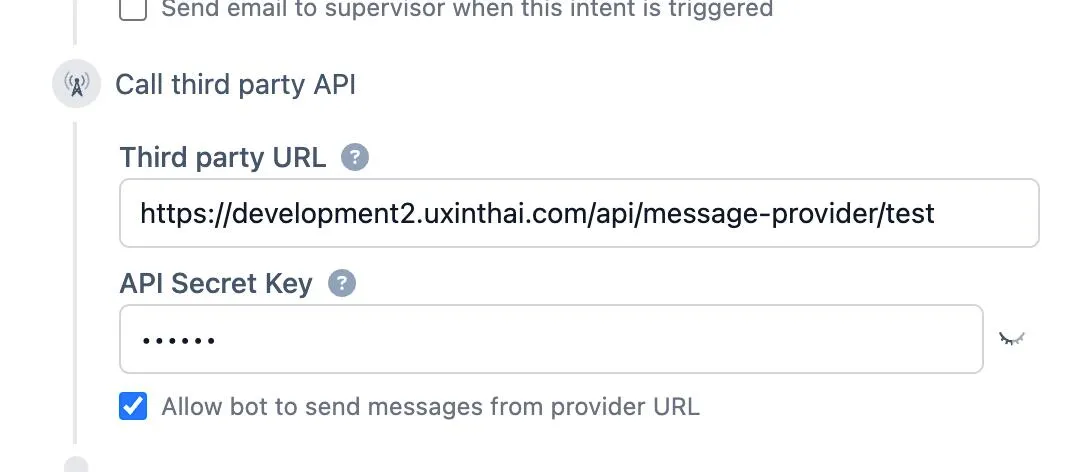
To configure webhooks for an intent:
- Log in to your DealDroid dashboard
- Navigate to Tuning → Intents from the left sidebar
- Click on an existing intent or create a new one
- Scroll to the bottom of the intent configuration page
- Find the “Call third party API” section
This is where you’ll configure how DealDroid communicates with your external system.
Configuration Fields Explained
Section titled “Configuration Fields Explained”Third party URL
Section titled “Third party URL”This is the public URL of your webhook endpoint that will receive POST requests from DealDroid when this intent is triggered.
Example: https://your-server.com/api/intent-handler
Requirements:
- Must be publicly accessible (DealDroid needs to reach it from the internet)
- Must use HTTPS (HTTP is not supported for security reasons)
- Should respond within 5 seconds to avoid timeouts
- Must accept POST requests with JSON body
Tips:
- Use a dedicated endpoint for each intent if you need different logic
- Or use a single endpoint and handle different intents based on the payload
- Include versioning in your URL (e.g.,
/api/v1/intent-handler) for future flexibility
API Secret Key
Section titled “API Secret Key”A unique secret token that DealDroid will include with every request to your endpoint. This lets you verify that requests are genuinely from your DealDroid bot and not from unauthorized sources.
Example: your_secure_secret_key_2024
Best practices:
- Use a long, random string (at least 32 characters recommended)
- Store it securely as an environment variable on your server
- Never commit it to version control or expose it in client-side code
- Rotate it periodically for security
- Can be left blank if your endpoint doesn’t require authentication (not recommended for production)
Security note: Always validate this secret on your server before processing requests. If the secret doesn’t match, reject the request with a 403 Forbidden response.
Allow bot to send messages from provider URL
Section titled “Allow bot to send messages from provider URL”When checked, this enables two-way communication between DealDroid and your system:
- DealDroid → Your System: When the intent triggers, DealDroid sends customer data to your URL
- Your System → DealDroid: Your endpoint can respond with messages that DealDroid will send to the customer
- Your System → DealDroid (Later): Your system can also send messages at any time using the webhook endpoint
Use cases:
- ✅ Enabled: Your system generates dynamic responses (payment links, order confirmations, personalized offers)
- ❌ Disabled: You only want to log data or trigger backend processes without responding to customers
Tip: Leave this checked for most use cases. It gives you maximum flexibility to respond to customers dynamically.
How Intent Webhooks Work
Section titled “How Intent Webhooks Work”Here’s the complete flow when a customer triggers an intent with webhook integration:
- Customer sends message — “I want to buy 2 bags of dog food”
- AI analyzes intent — Detects “Purchase” intent
- DealDroid sends webhook — POST request to your configured URL with complete context
- Your system processes — Generates payment link, creates order, updates CRM, etc.
- Your system responds — Returns messages to send to the customer
- DealDroid delivers — Sends your messages to the customer seamlessly
- Later: Your system can send more messages — Use the webhook endpoint to send updates (payment confirmation, shipping updates, etc.)
This creates a seamless experience where external systems power the conversation without customers knowing the complexity behind the scenes.
Request Format: DealDroid → Your System
Section titled “Request Format: DealDroid → Your System”When an intent triggers, DealDroid sends a POST request to your configured URL with comprehensive conversation context.
TypeScript Type Definition
Section titled “TypeScript Type Definition”type IntentWebhookRequest = { // Message tracking mid: string; customer_id: string;
// Intent information intent: string;
// Parsed customer address address_parsing: { street_address: string; village_or_project: string; subdistrict: string; district: string; city: string; state: string; postal_code: string; country: string; };
// Payment preference payment_method: | "bank_transfer" | "cash_on_delivery" | "credit_card" | "other";
// Shopping cart details shopping_cart: { products: Array<{ code: string; name: string; price: number; count: number; total: number; available: boolean; }>; shippingFee: string; grandTotal: string; unavailableCount: number; };
// Contact information contact_info: { name: string; phone: string; email: string; address: string; city: string; zipcode: string; language: string; languageName: string; };
// Security secret: string; // Your configured API Secret Key
// Additional context folder: string; e: string; product_type: string;};Field Reference
Section titled “Field Reference”| Field | Type | Description |
|---|---|---|
mid | string | Unique message identifier for tracking |
customer_id | string | Unique customer identifier (use this for webhook callbacks) |
intent | string | The name of the triggered intent |
address_parsing | object | AI-parsed delivery address components |
payment_method | string | Customer’s preferred payment method |
shopping_cart | object | Complete cart with products, totals, and availability |
contact_info | object | Customer contact details collected by the AI |
secret | string | Your API Secret Key for validation |
folder | string | Internal organization identifier |
e | string | Environment/workspace identifier |
product_type | string | Type of products in conversation |
Webhook Integration: Your System → DealDroid
Section titled “Webhook Integration: Your System → DealDroid”Beyond responding to intent triggers, your system can send messages to customers at any time using DealDroid’s webhook endpoint. This is perfect for asynchronous updates like payment confirmations, shipping notifications, or status changes.
Webhook Endpoint
Section titled “Webhook Endpoint”URL: https://app.dealdroid.net/api/provider/webhook/
Method: POST
Content-Type: application/json
Request Body
Section titled “Request Body”{ customer_id: string; // The customer_id from the intent webhook request messages: string[]; // Array of messages to send}Example: Payment Confirmation
Section titled “Example: Payment Confirmation”{ "customer_id": "b9d35283-131d-4c85-9d66-c43d830daec0", "messages": [ "✅ Payment received! Thank you!", "📦 Your order is being prepared", "🚚 Expected delivery: 2-3 business days" ]}Example: Shipping Update
Section titled “Example: Shipping Update”{ "customer_id": "b9d35283-131d-4c85-9d66-c43d830daec0", "messages": [ "🚚 Your order has been shipped!", "📦 Tracking number: TH789456123", "Track here: https://track.thailand-post.com/TH789456123" ]}Response
Section titled “Response”A successful message delivery will receive:
- Status Code:
200 OK - Response Body:
[OK]
Security & Best Practices
Section titled “Security & Best Practices”Always validate the secret key:
const validateSecret = (req, res, next) => { if (req.body.secret !== process.env.API_SECRET) { return res.status(403).json({ error: "Forbidden" }); } next();};Key security practices:
- ✅ Use HTTPS only (never HTTP)
- ✅ Validate all input data before processing
- ✅ Respond within 5 seconds to avoid timeouts
- ✅ Store secrets in environment variables
- ✅ Log all requests for debugging
Troubleshooting
Section titled “Troubleshooting”| Issue | Solution |
|---|---|
| Webhook not triggering | Check intent is enabled, URL is correct, and “Call third party API” checked |
| 403 Forbidden | Verify secret key matches exactly (check for spaces) |
| Timeout errors | Respond immediately, process heavy tasks in background |
| Messages not appearing | Ensure “Allow bot to send messages” is checked, response is array of strings |
| Invalid customer_id | Use exact customer_id from request, don’t modify it |
| Question | Answer |
|---|---|
| Can one intent trigger multiple webhooks? | No, but your endpoint can trigger multiple downstream systems |
| What if my webhook returns an error? | DealDroid continues normally, but response won’t be delivered. Handle errors gracefully |
| How long do I have to respond? | Within 5 seconds. For longer processes, respond immediately and use async webhook for updates |
| Can I send images via webhook? | No, text only. Configure images in intent settings |
| Is there a rate limit? | Depends on your plan. Contact support for specifics |
| Can I test without real orders? | Yes! Use test endpoint or implement test mode |
That’s It! 🎉
Section titled “That’s It! 🎉”You’re now ready to connect your DealDroid bot to any external system!
Intent Webhooks unlock powerful automation possibilities — from generating payment links to integrating with your entire business infrastructure. With real-time intent detection and two-way communication, you can build sophisticated workflows that feel seamless to your customers.
Key takeaways:
- 🎯 Configure webhooks within each intent
- 🔒 Always validate the secret key
- ⚡ Respond quickly (under 5 seconds)
- 🔄 Use async webhooks for updates
- 📊 Log everything for debugging
Ready to build something amazing? Start with a simple payment link generator and expand from there!
Need help? We’re here to support you! 😊