
Add Intents
Ever wished your AI could shift its tone based on what’s happening in the conversation? Like greeting new customers with an enthusiastic “Hey there! 👋” while handling checkout with professional precision? That’s exactly what Intents do — they give your AI the emotional intelligence to adapt to every situation.
Why Intents Matter
Section titled “Why Intents Matter”Intents are what make your bot feel like a real conversation partner instead of a robotic question-answering machine. They let your AI change its tone based on context — from friendly welcomes to serious sales conversations — creating a natural experience that feels authentic and helpful.
Think of intents as your AI’s situational awareness:
- 🎭 Adapts personality — Shifts tone smoothly from casual to professional as needed
- 🎯 Stays on target — Keeps conversations focused on the right goal for each situation
- 💬 Feels natural — Responds like a human would, not like a script reader
- ✨ Builds trust — Appropriate responses in every situation create customer confidence
Note: Well-designed intents are what separate a smart sales agent from a basic chatbot. They help your AI understand context and respond appropriately, making every interaction feel personalized and relevant.
Understanding Voice vs. Tone
Section titled “Understanding Voice vs. Tone”Before we dive in, let’s clarify two important concepts. Your bot has one consistent Voice (its core personality), but the Tone (how it expresses that personality) should change based on the situation.
- Voice: Your bot’s overall personality. Is it playful? Professional? Supportive?
- Tone: The attitude your bot shows in a specific moment. Welcoming? Persuasive? Reassuring?
Intents are how you control Tone. They let you define exactly how your AI should behave in different scenarios while maintaining your brand voice.
How to Access Intents
Section titled “How to Access Intents”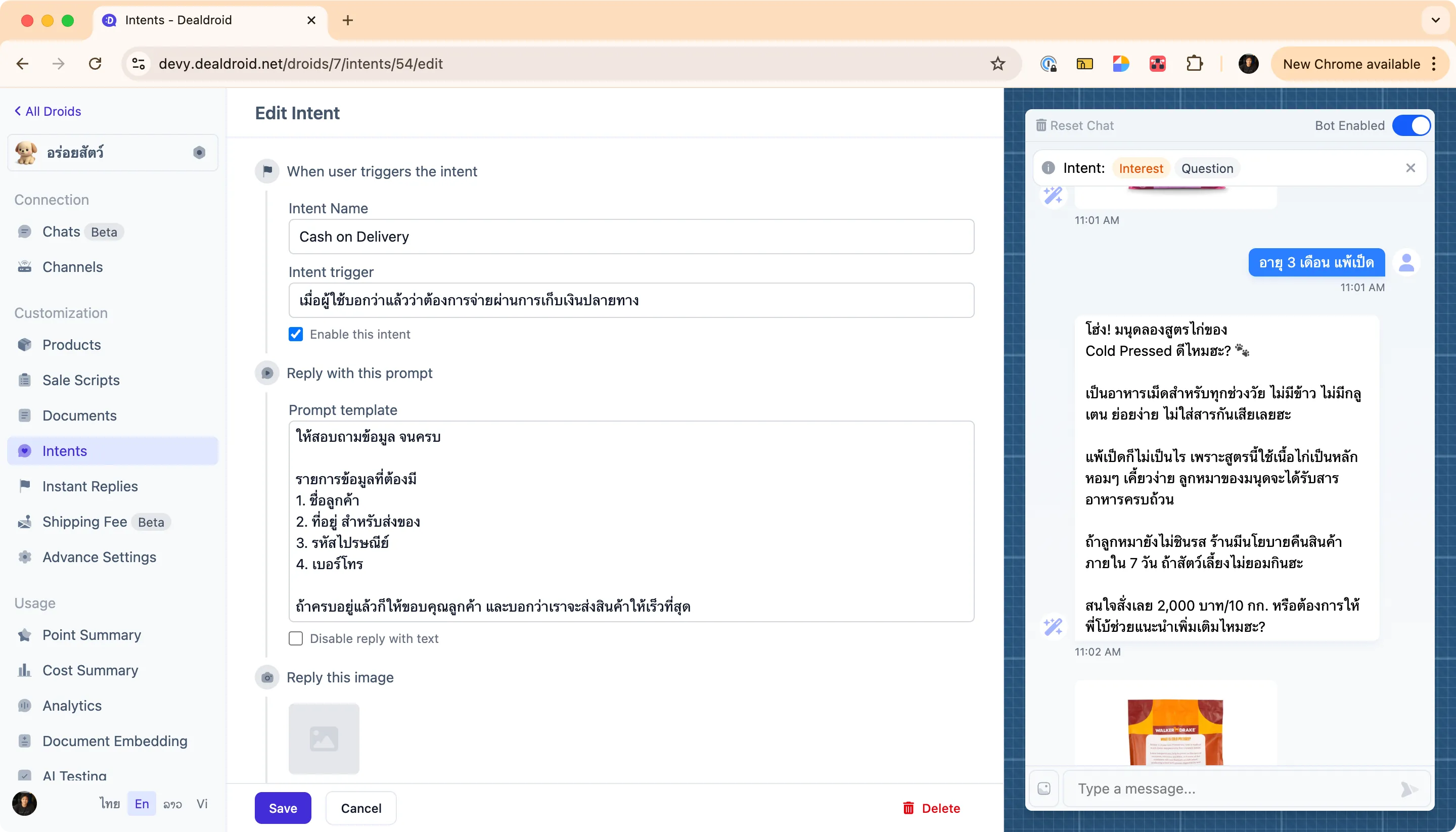
You can find the intent management screen by logging into your DealDroid dashboard and navigating to the Intents menu from the left sidebar.
From here, you can:
- ➕ Create new intents to handle specific customer situations
- ✏️ Edit existing intents to refine your AI’s responses
- 🗑️ Delete intents that are no longer needed
- 👁️ Preview responses using the chat panel on the right
How Your AI Uses Intents
Section titled “How Your AI Uses Intents”When a customer message arrives, your Droid follows this process:
- Analyzes the message — What is the customer trying to accomplish?
- Matches to an intent — Which intent best fits this situation?
- Applies the prompt — Uses the intent’s instructions to craft a response
- Delivers naturally — Responds in a way that feels conversational and helpful
This happens instantly, giving your customers quick, contextually appropriate responses every time.
Intent Fields Explained
Section titled “Intent Fields Explained”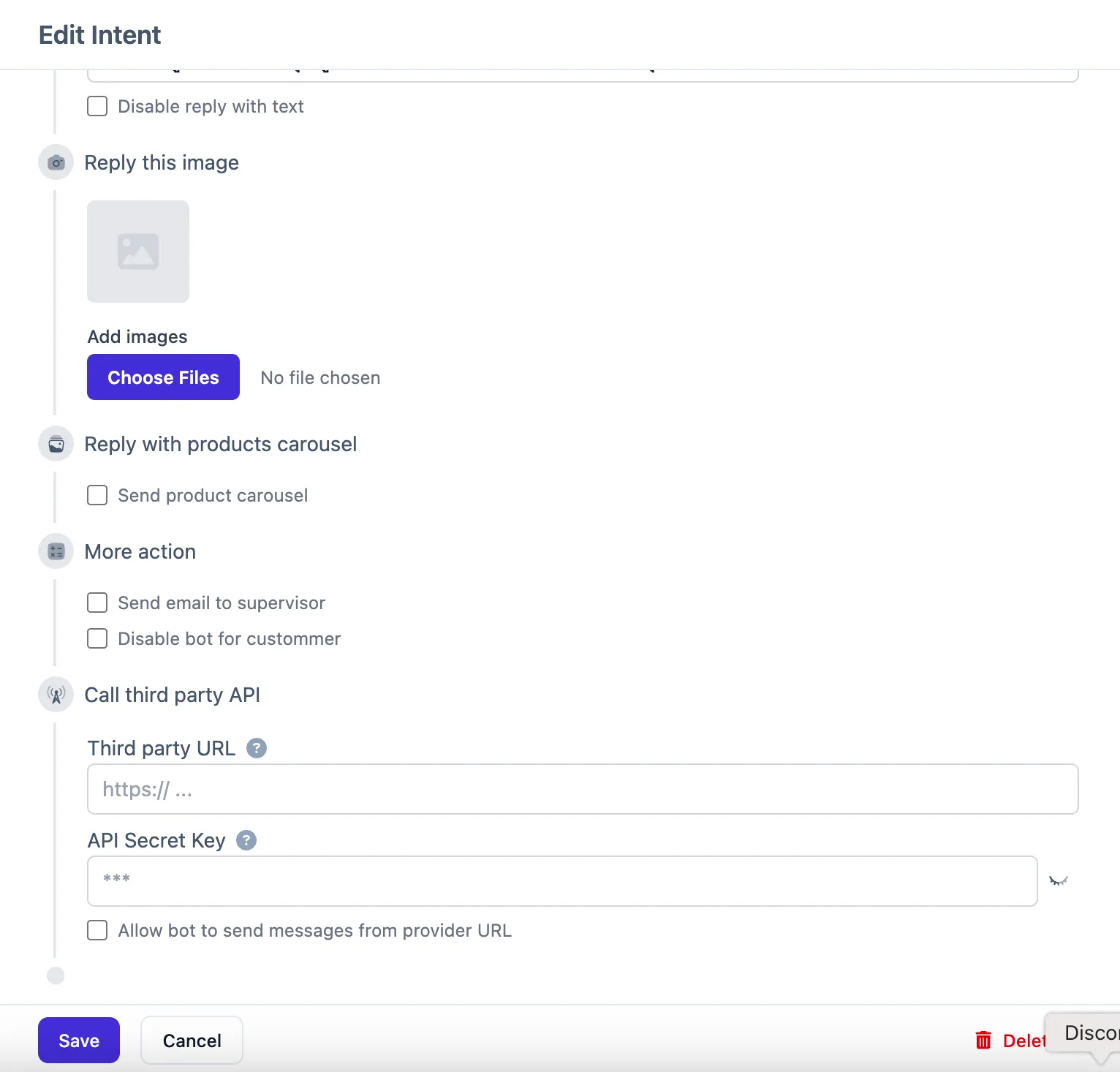
Here’s a field-by-field guide to creating effective intents. Each field plays a crucial role in helping your AI understand when and how to respond.
Intent Name
Section titled “Intent Name”This is a clear, descriptive label for what the customer is trying to accomplish.
Character requirements:
- ✅ English letters only (A-Z, a-z)
- ✅ Spaces are allowed
- ❌ No special characters (no parentheses, commas, symbols, etc.)
- ⚠️ Keep it under 20 characters
Tips:
- Use simple, action-oriented names
- Make it easy to identify the intent’s purpose at a glance
- Keep it short and memorable
Examples:
Greeting— When customers first start a conversationPurchase— When customers are ready to buyProduct Question— When customers ask about products or policiesComplaint— When customers express dissatisfactionPrice Negotiation— When customers ask for discounts
Invalid names:
- ❌ “Greeting (First Time)” — Contains special characters
- ❌ “Purchase, Checkout, Buy” — Contains commas
- ❌ “Product Question and Information Request” — Too long (over 20 characters)
Intent Trigger
Section titled “Intent Trigger”This describes the situation that should activate this intent. Be specific about what signals indicate this intent.
What to include:
- Clear description of customer behavior or message content
- Specific phrases or keywords that indicate this intent
- The context or timing when this should trigger
Examples:
When a customer greets you for the first time in a conversation.When a customer asks for a discount or tries to negotiate the price.When a customer expresses dissatisfaction or complains about a product.When a customer has confirmed they want to proceed with payment.Important: Be specific enough to catch the right situations, but not so narrow that legitimate cases get missed.
Enable this intent
Section titled “Enable this intent”A simple on/off switch for this intent. If unchecked, your AI will ignore this intent completely — useful for testing or temporarily disabling specific behaviors.
Prompt Template
Section titled “Prompt Template”This is the most important field! ✨ This is where you define exactly how your AI should respond when this intent triggers.
You can approach this in two ways:
Approach 1: Goal-Oriented Instructions (Recommended)
Give your AI clear goals and guidelines, letting it adapt naturally:
Goal: Create an amazing first impression and discover what the customer needs
Guidelines:- Start with a warm, enthusiastic welcome + cute pet emoji- Ask about their pet immediately to build connection- Show expertise to establish credibility
Example tone:"Hey there! What can I help your furry friend with today? Let me know your pet's age and I'll recommend the perfect products! 😊"
Why this approach works best:
The beauty of goal-oriented instructions is flexibility. You’ll always encounter unexpected situations in real conversations. When you define principles instead of rigid scripts, your AI can adapt to whatever comes up — making responses feel natural, authentic, and conversational rather than robotic or scripted.
Approach 2: Structured Steps
Provide specific step-by-step instructions:
1. Kick things off with a super friendly and energetic welcome! Use a fun emoji. 🥳2. Introduce yourself as 'the shop's AI buddy'.3. End with a fun, open-ended question like, 'What awesome adventure are we shopping for today? ✨'When to use this approach:
Use structured steps when you need your AI to follow a specific sequence — particularly useful for processes that must happen in order, like collecting customer information, confirming details, or following compliance requirements.
Approach 3: Information Collection
Define what information you need, and let your AI intelligently track what’s been collected and what’s still missing:
Goal: Collect all required delivery information from the customer
Required information:1. Customer name2. Phone number3. Delivery address4. Postal code
Instructions:- Keep track of what information you've already received- Let the customer know what you still need- Allow the customer to provide information in any order or format- If something is unclear, ask for clarification- Once you have everything, confirm all details before finishing
Example:"Great! I have your name and phone number. I just need your delivery address and postal code to complete your order. 📦"
Why this approach is powerful:
This method leverages the AI’s natural ability to track context across multiple messages. Instead of rigidly asking “Question 1, Question 2, Question 3,” the AI can accept information in any order, acknowledge what it has received, and naturally ask for what’s missing — making the conversation feel much more natural and conversational.
When to use this approach:
Perfect for checkout flows, contact information gathering, form completion, or any scenario where you need to collect multiple pieces of information but want the conversation to feel flexible and natural rather than like filling out a form.
Best practices:
- Focus on goals and outcomes, not word-for-word scripts
- Include the tone you want (enthusiastic, professional, reassuring, etc.)
- Provide examples to guide the AI’s style
- Keep instructions clear and actionable
- Match your overall brand voice
If you don’t want the droid to reply with text
Section titled “If you don’t want the droid to reply with text”Sometimes you want an intent that only triggers actions (like sending images or product carousels) without a text response. Check this box to disable the text reply for this intent.
When to use:
- Sending visual content that speaks for itself
- Triggering automated processes without commentary
- Quick acknowledgments that don’t need explanation
Adding Visual and Interactive Elements
Section titled “Adding Visual and Interactive Elements”Beyond text responses, intents can trigger multiple types of actions to create rich, engaging conversations.
Reply this image
Section titled “Reply this image”Upload images that should automatically send when this intent triggers.
Great for:
- Welcome banners when customers first arrive
- Visual guides for common questions
- Product showcases or promotions
- Step-by-step instruction images
Smart behavior: DealDroid won’t send the same image repeatedly in a short time, preventing annoying repetition.
Send product carousel
Section titled “Send product carousel”Enable this to automatically show customers a scrolling product catalog when this intent triggers.
Perfect for:
- Showcasing featured products after greetings
- Displaying relevant items when customers ask about categories
- Presenting options during purchase conversations
Tip: You can configure which products appear in carousels in your product settings by marking items as “featured.”
Advanced Actions
Section titled “Advanced Actions”These powerful options let your intents do more than just talk — they can trigger important business processes.
Send email to supervisor
Section titled “Send email to supervisor”When this intent triggers, DealDroid will automatically send an email notification to your supervisor address (configured in main settings).
Use cases:
- Customer requests human assistance
- High-value purchase detected
- Complaint or sensitive issue raised
- VIP customer identification
Turn droid off here
Section titled “Turn droid off here”This pauses your AI for this specific customer, allowing human team members to take over the conversation.
When to use:
- Customer explicitly asks to speak with a human
- Complex situation requiring human judgment
- After collecting information that needs manual processing
- Sensitive issues requiring personal attention
Important: Make sure your team knows to monitor for these handoff situations!
Call third party API
Section titled “Call third party API”For advanced integrations! This lets you connect to external systems via webhook when an intent triggers.
Configuration:
- Third party URL: The endpoint DealDroid should call
- API Secret Key: Authentication credential for the external service
- Enable checkbox: Turn this integration on/off
Example use cases:
- Generate unique payment links when purchase intent triggers
- Update external CRM systems with customer information
- Trigger custom workflows in your business systems
- Sync conversation data to analytics platforms
Test endpoint available:
POST http://happy.dealdroid.net/api/message-provider/testNote: The external service will receive conversation context and can return additional messages or instructions for the AI to follow.
Connecting Intents for Smooth Conversations
Section titled “Connecting Intents for Smooth Conversations”You can design intents that work together to create seamless, multi-step conversations that guide customers naturally through complex processes.
Example: Purchase Flow
Section titled “Example: Purchase Flow”Intent 1: “Purchase” — When customer is ready to buy
Goal: Close the sale and increase order value
Guidelines:- Recommend the most cost-effective size and explain savings- Offer bundles/promotions to add value- Provide guarantees to reduce hesitation- Cross-sell related items naturally- Ask if they want to pay by bank transfer or cash on delivery
This intent ends by asking about payment method. The customer’s answer triggers the next specialized intent:
Intent 2: “Cash on Delivery” — When customer chooses COD payment
Goal: Collect all required customer information
Required information:1. Customer name2. Delivery address3. Postal code4. Phone number
Once all information is collected, thank the customer and confirm we'll ship ASAP.
Intent 3: “Bank Transfer” — When customer chooses bank payment
Goal: First, provide bank transfer details: Kasikorn Bank, Account 234-2234-3434, Name "Yummy Pet Store"
Then collect all required customer information:1. Customer name2. Delivery address3. Postal code4. Phone number
Once complete, thank them and confirm we'll ship once payment is verified.
The Magic of Intent Chaining
Section titled “The Magic of Intent Chaining”By setting the Intent Trigger to “When customer has confirmed they want this option,” you create goal-oriented intents that persist across multiple messages until the task is complete.
Benefits:
- 🎯 Focused conversations — AI stays on task until goal is achieved
- 📝 Complete information — Collects all needed data even across multiple messages
- 🤝 Natural flow — Doesn’t feel robotic or rushed
- ✅ Reliable results — Ensures nothing gets missed
Real-World Intent Examples
Section titled “Real-World Intent Examples”Here are practical, ready-to-use intent examples you can adapt for your business:
Intent: “Greeting”
Section titled “Intent: “Greeting””Intent Name: Greeting
Intent Trigger: When a customer starts the conversation for the first time.
Prompt Template:
Goal: Create an amazing first impression and discover what the customer needs
Guidelines:- Start with a warm, enthusiastic welcome + cute emoji- Introduce yourself as the shop's AI assistant- Ask an engaging question to understand their needs- Show excitement about helping them
Example:"Hey there! 🎉 I'm your AI shopping buddy here to help you find exactly what your furry friend needs! What kind of adventure are we shopping for today? 🐾"
Enable: ✅ Yes
Intent: “Price Negotiation”
Section titled “Intent: “Price Negotiation””Intent Name: Price Negotiation
Intent Trigger: When a customer asks for a discount, tries to negotiate price, or says the product is too expensive.
Prompt Template:
Goal: Maintain pricing integrity while keeping the customer engaged
Guidelines:- Acknowledge their concern warmly- Explain the value they're getting (quality, benefits, guarantees)- Offer alternative options (smaller sizes, bundles, payment plans)- Emphasize what makes the product worth the investment- Never directly discount without approval
Example approach:"I totally understand! Quality products are an investment. Here's why customers love this one: [benefits]. If budget is a concern, we also have [smaller size] or I can show you similar products that might work better for your budget?"
Enable: ✅ Yes
Intent: “Product Question”
Section titled “Intent: “Product Question””Intent Name: Product Question
Intent Trigger: When a customer asks about product details, ingredients, usage, or specifications.
Prompt Template:
Goal: Provide complete, accurate product information that builds confidence
Guidelines:- Answer the specific question clearly and completely- Add relevant details the customer might not have thought to ask- Relate information to benefits for their pet- Offer to show the product or provide more details- Be the expert — confident and knowledgeable
Keep answers focused but thorough. If you don't have specific information, say so honestly and offer to connect them with the team.
Enable: ✅ Yes
Intent: “Complaint”
Section titled “Intent: “Complaint””Intent Name: Complaint
Intent Trigger: When a customer expresses dissatisfaction, disappointment, or reports a problem with a product or service.
Prompt Template:
Goal: Acknowledge the issue, show empathy, and resolve the situation
Guidelines:- Start with genuine empathy and apology- Ask for specific details about what happened- Take ownership — never make excuses- Offer clear next steps to resolve- Reassure them you'll make it right
Tone: Caring, professional, solution-focused
Example:"I'm so sorry to hear that happened! That's definitely not the experience we want for you and your pet. Can you tell me more about what went wrong? I want to make sure we fix this for you right away."
Actions:
- ✅ Send email to supervisor
- ✅ Turn droid off here (so human can take over)
Enable: ✅ Yes
Intent: “Other” — The Catch-All Fallback
Section titled “Intent: “Other” — The Catch-All Fallback”Intent Name: Other
Intent Trigger: When the customer’s message doesn’t clearly match any other intent.
Prompt Template:
Goal: Respond helpfully without making assumptions
Guidelines:- Acknowledge their message politely- Ask clarifying questions to understand what they need- Stay friendly and helpful- Guide them toward common topics (products, orders, questions)
Example:"That's a great question! Let me make sure I understand exactly what you're looking for so I can help you best. Are you asking about [option A], [option B], or something else?"
Enable: ✅ Yes
Critical: Always create an “Other” fallback intent! Without it, your AI won’t respond to unexpected messages, leaving customers confused. This intent ensures your bot always has something helpful to say.
Pro Tips for Success 💡
Section titled “Pro Tips for Success 💡”1. Start Simple, Then Expand
Section titled “1. Start Simple, Then Expand”Begin with these essential intents:
- ✅ Greeting — First impressions matter
- ✅ Purchase — Close those sales
- ✅ Question — Answer inquiries confidently
- ✅ Other — Catch everything else
More complex intents can follow sales funnels:
-
Top of Funnel (Awareness & Interest):
- ✅ Greeting — First impressions matter, welcome new customers
- ✅ Question — Answer inquiries and build interest
-
Middle of Funnel (Consideration):
- ✅ Product Question — Address specific product concerns
- ✅ Price Negotiation — Handle pricing objections professionally
-
Bottom of Funnel (Conversion):
- ✅ Purchase — Close those sales and collect information
-
Post-Purchase & Support:
- ✅ Complaint — Handle issues with empathy
-
Safety Net:
- ✅ Other — Catch everything else that doesn’t fit above
Add specialized intents as you learn what your customers need most.
2. Keep Prompts Flexible
Section titled “2. Keep Prompts Flexible”Don’t write rigid, word-for-word scripts. Instead:
❌ Too rigid:
Say exactly: "Hello! Welcome to our store. How can I help you today?"✅ Flexible and effective:
Greet the customer warmly and ask how you can help. Be enthusiastic and welcoming.The flexible approach lets your AI adapt naturally to different situations while maintaining the right tone.
3. Match Your Brand Voice
Section titled “3. Match Your Brand Voice”Your intent prompts should reflect your overall brand personality (set in Advanced Settings → Bot Personality).
If your brand is:
- Playful → Use fun language, emojis, and casual tone
- Professional → Use polished language, formal tone, clear structure
- Empathetic → Use warm language, show understanding, ask caring questions
Important: Inconsistent voice confuses customers. If your main personality is “Professional Assistant” but your greeting intent sounds like “Bubbly Shopping Buddy,” your bot will feel disjointed.
4. Test Thoroughly
Section titled “4. Test Thoroughly”After creating intents, test them using the chat preview panel:
Try these tests:
- Type greetings in different ways
- Ask about products using various phrasings
- Try to negotiate or ask for discounts
- Express complaints or problems
- Type random or unexpected messages
What to check:
- ✅ Does the right intent trigger?
- ✅ Does the tone feel appropriate?
- ✅ Are responses helpful and natural?
- ✅ Does the fallback intent catch unusual cases?
5. Monitor and Improve
Section titled “5. Monitor and Improve”Your intents are living documents. Keep improving them:
- 📊 Review real conversations regularly
- 🤔 Identify where the AI struggles and refine those intents
- ➕ Add new intents for common situations you didn’t anticipate
- ✏️ Update prompts based on what works in real conversations
Common Mistakes to Avoid
Section titled “Common Mistakes to Avoid”❌ No Fallback Intent
Section titled “❌ No Fallback Intent”Problem: Without an “Other” intent, your AI won’t respond to unexpected messages.
Solution: Always create a catch-all “Other” intent for situations that don’t match specific intents.
❌ Overly Specific Triggers
Section titled “❌ Overly Specific Triggers”Problem: Triggers that are too narrow miss legitimate cases.
Bad example: “When customer types ‘I want to buy the 10kg duck dog food’”
Better example: “When customer indicates they’re ready to make a purchase”
❌ Too Many Intents
Section titled “❌ Too Many Intents”Problem: Having 20+ intents makes management difficult and can confuse the AI.
Solution: Start with 5-8 core intents. Add more only when you identify clear, distinct situations that need special handling.
❌ Inconsistent Tone Across Intents
Section titled “❌ Inconsistent Tone Across Intents”Problem: Greeting sounds playful, but purchase sounds robotic — creates a jarring experience.
Solution: Review all your intents together to ensure consistent brand voice even as tone shifts appropriately.
❌ Overly Long Prompt Templates
Section titled “❌ Overly Long Prompt Templates”Problem: Writing extremely long, detailed instructions with too many rules and conditions overwhelms the AI, making it unclear what to prioritize.
Bad example:
Goal: Welcome the customer and make them feel special and also ask about their pet but also mention our store history and our values and also tell them about current promotions and also ask if they need help and also introduce yourself and explain all our product categories and mention our return policy and ask about their budget...Better example:
Goal: Create a warm first impression and discover what the customer needs
Guidelines:- Welcome them enthusiastically- Ask about their pet to build connection- Offer to help them find what they need
Solution: Keep prompts focused and concise. Break complex scenarios into separate intents rather than trying to handle everything in one overwhelming instruction set. Clear, focused guidance produces better results than lengthy, complicated instructions.
Pro Tip: If you have lots of detailed information (product specs, policies, FAQs), put it in Knowledge (Documents) instead of intent prompts. Knowledge can be accessed across all intents and situations, while intent prompts should focus on behavior and tone, not storing information.
Add Knowledge Learn how to add documents and FAQs to teach your AI about your business policies, return policies, and other important information.
That’s It! 🎉
Section titled “That’s It! 🎉”Your AI now has emotional intelligence!
With well-crafted intents, your Droid will handle every conversation with the right tone, appropriate responses, and natural flow. This is what transforms a basic chatbot into a trusted sales assistant that customers actually enjoy talking to.
Remember: Intents are living documents. As you learn more about your customers and their needs, keep refining your intents to create even better experiences.
As always, we’re here if you need help. Happy selling! 😊
Need More Help?
Section titled “Need More Help?”Check out our step-by-step visual guide: