
Add Products
Ready to turn your AI agent into a product expert? Adding your product information to DealDroid is the key to helping your AI answer customer questions accurately and close sales effectively. This guide will show you how to do it efficiently.
Why Product Information Matters
Section titled “Why Product Information Matters”Well-structured product information is the “brain” of your AI agent. The better the information, the smarter the answers!
Giving clear details helps your AI:
- 🎯 Find the right product for your customers
- 💬 Answer questions with confidence and accuracy
- ⚡ Make the whole process smoother and faster for everyone
- 💰 Close sales more effectively with complete information
How Your AI Uses Product Info
Section titled “How Your AI Uses Product Info”When you add a product, the information serves two main purposes:
-
Keyword or Short Description: The system first looks at all your product Keywords to get a quick overview. This helps the AI decide which products are most relevant to the customer’s question at a glance.
-
Full Description: Once a product is chosen, the AI uses the Full Description and Images to provide specific, detailed answers to the customer.
This two-stage process ensures your AI can quickly narrow down options and then provide detailed, accurate information when needed.
How to Setup Your Products Effectively
Section titled “How to Setup Your Products Effectively”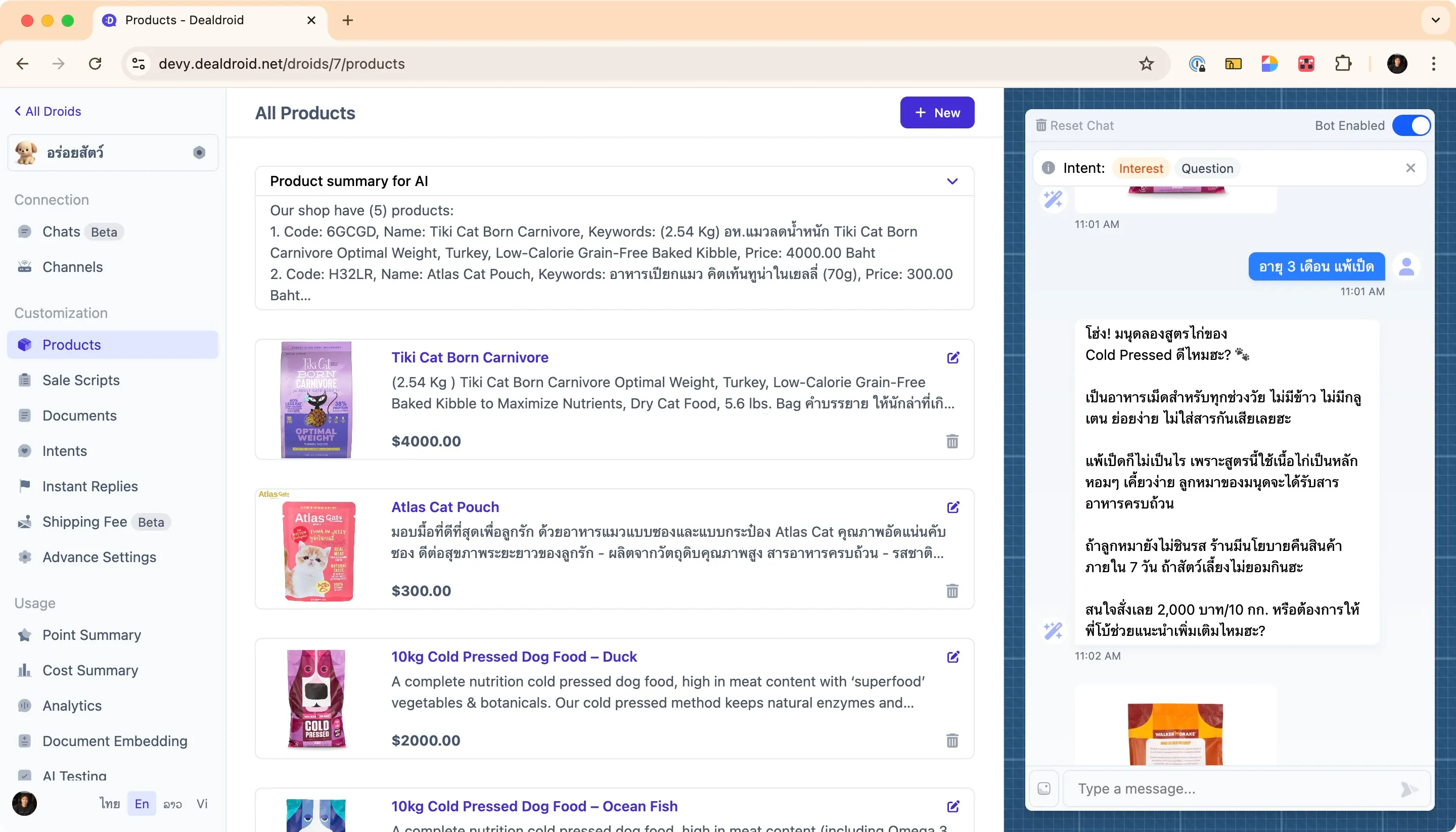
You can find the product management screen by logging into your DealDroid dashboard and navigating to the Products menu from the left sidebar.
From here, you can:
- ➕ Add new products using the ”+ New” button
- ✏️ Edit existing products by clicking the edit icon
- 🗑️ Delete products that are no longer available
- 👁️ Preview how your AI responds using the chat panel on the right
Product Fields Explained
Section titled “Product Fields Explained”Here’s a field-by-field guide to adding a new product. Each field plays an important role in helping your AI understand and present your products effectively.
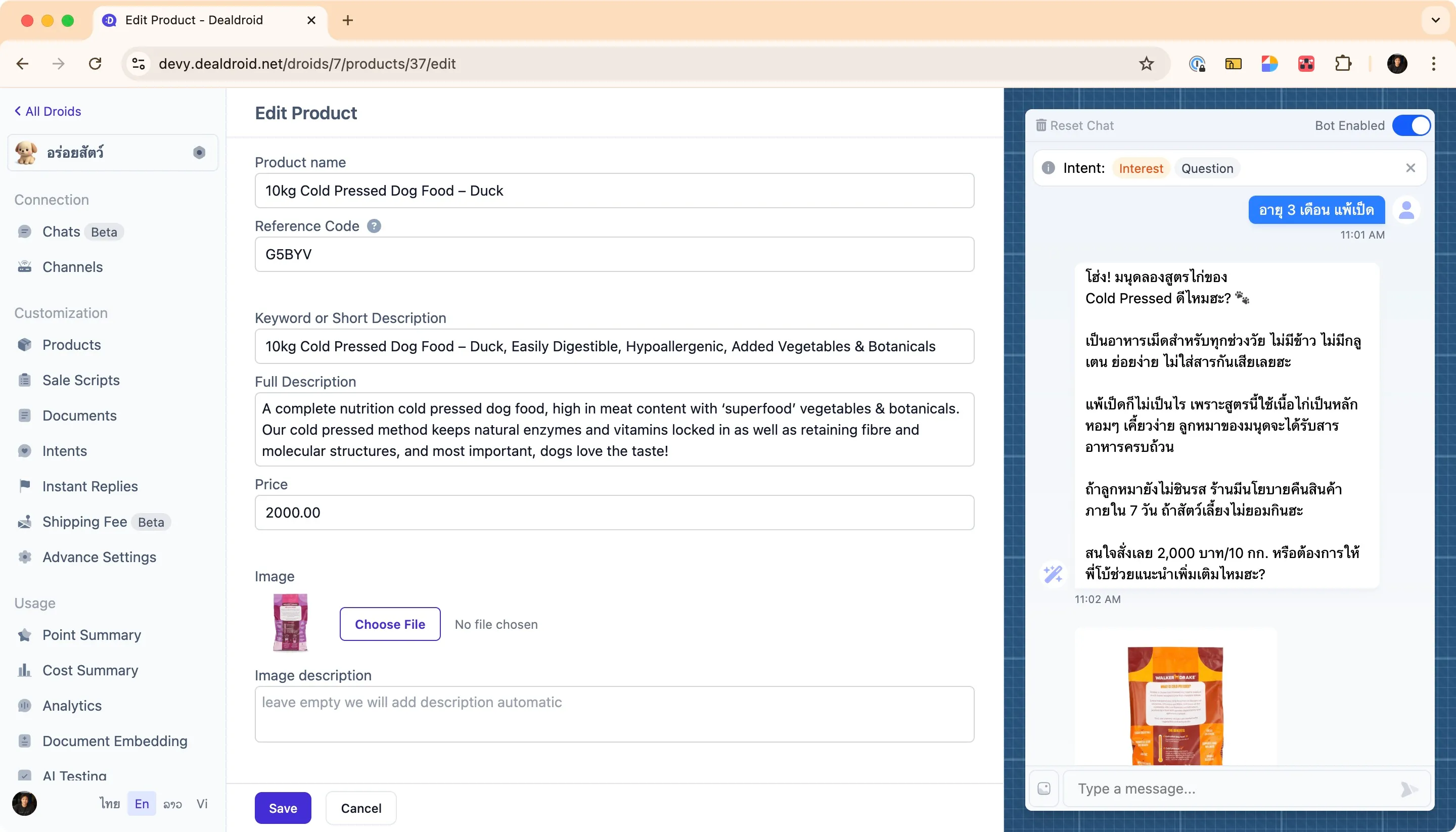
Product Name
Section titled “Product Name”This is the official name of your product. Use the language your customers use, as the AI can handle translations on its own.
Tips:
- Include key details in the name if you have similar products
- Be specific and descriptive
- Use natural language that customers would search for
Example: 10kg Cold Pressed Dog Food – Duck
This is better than just “Dog Food” because it includes the size, type, and flavor — all important details.
Reference Code
Section titled “Reference Code”This is an internal code (like a SKU) for your product.
Example: G5BYV, ABCD-12, DOG-DUCK-10KG
Use cases:
- Internal inventory tracking
- Integration with external APIs (like shopping cart systems)
- Order management and fulfillment
If you use an external API for things like managing a shopping cart, this code will be sent along for easy reference.
Keyword or Short Description
Section titled “Keyword or Short Description”This provides a brief description of the product to give the AI an overview of all products.
Think of this as a super-quick summary. What are the absolute key features? The AI uses this to get a fast overview when comparing multiple products.
Example:
10kg Cold Pressed Dog Food – Duck, Easily Digestible, Hypoallergenic, Added Vegetables & BotanicalsWhat to include:
- Product name (if it contains important keywords)
- Key features and benefits
- Main differentiators
- Important specifications
Keep it concise — aim for 1-2 lines that capture the essence of the product.
Full Description
Section titled “Full Description”This is where you put all the juicy details about the product. Focus on the specifics of this single item.
What to include:
- Complete product specifications
- Detailed features and benefits
- Usage instructions or recommendations
- Materials, ingredients, or components
- Size, weight, dimensions
- Care instructions or important notes
What NOT to include here:
- General company information
- Shipping policies
- Return policies
- FAQs that apply to all products
Note: If you have general information that applies to many products (like your company history or shipping policies), it’s better to put that in the Documents section to keep things tidy.
Example:
A complete nutrition cold pressed dog food, high in meat content with 'superfood' vegetables & botanicals. Our cold pressed method keeps natural enzymes and vitamins locked in as well as retaining fibre and molecular structures, and most important, dogs love the taste!Simply enter the product’s price as a number.
Example: 2000.00
Note: The currency is configured in your main Droid Settings, so you don’t need to include currency symbols here.
Image & Cover Image
Section titled “Image & Cover Image”A picture is worth a thousand words! You can add two types of images:
- Image: A standard product photo showing the product clearly (e.g., package front, product details, ingredients label)
- Cover Image: A more promotional “hero” image that grabs attention (e.g., product in use, lifestyle shot, marketing banner)
Image Guidelines:
⚠️ Keep it snappy! To make sure your images load quickly for customers, try to keep the file size under 1MB. This avoids making the user wait.
Best practices:
- Use clear, high-resolution images
- Show the product from multiple angles if possible
- Include context (product in use, scale reference, etc.)
- Optimize file size without sacrificing quality
- Use JPG for photos, PNG for graphics with transparency
Image Description & Cover Image Description
Section titled “Image Description & Cover Image Description”This text helps the AI (and visually impaired users) understand what’s in the image.
How DealDroid handles image descriptions:
DealDroid automatically generates image descriptions for you using AI. When you upload an image and save:
- ✨ If the description field is empty — DealDroid will automatically generate a detailed description based on what it sees in the image
- ✏️ If you’ve written your own description — DealDroid will keep your text and won’t overwrite it
- 🔄 If you want DealDroid to regenerate — Simply delete the existing description (leave it blank) and click Save. DealDroid will create a new one for you
Why image descriptions matter:
- 🤖 Provides more context to the AI for better product recommendations
- ♿ Improves accessibility for visually impaired users
- 🎯 Helps the AI understand product features visible in the image
- 🔍 Better SEO if used on websites
You can always edit the AI-generated description to add specific details or match your brand voice.
Best practices for writing image descriptions:
- 📝 Start with the product name — This helps the AI identify which product the image belongs to
- 🎨 Describe visual details — Colors, packaging, size, materials
- 📦 Mention key features shown — Labels, ingredients, benefits visible in the image
- 📏 Keep it concise but informative — 1-2 sentences is usually enough
Example of a good image description:
10kg Cold Pressed Dog Food – Duck: A 10kg bag in purple packaging, showing duck as the main ingredient. The bag displays nutritional information and product benefits on the front.Notice how the product name comes first, followed by descriptive details. This helps the AI understand and match the image to the correct product.
Example: Complete Product Entry
Section titled “Example: Complete Product Entry”Here’s a full example showing all fields filled out correctly:
**Name:** 10kg Cold Pressed Dog Food - Duck
**Reference Code:** G5BYV
**Keyword or Short Description:**10kg Cold Pressed Dog Food - Duck, Easily Digestible, Hypoallergenic, Added Vegetables & Botanicals
**Full Description:**A complete nutrition cold pressed dog food, high in meat content with 'superfood' vegetables & botanicals. Our cold pressed method keeps natural enzymes and vitamins locked in as well as retaining fibre and molecular structures, and most important, dogs love the taste!
**Price:** 2000.00
**Image:** [Upload product package photo]
**Image Description:**A 10kg bag of cold pressed dog food with duck as the main protein. The purple packaging shows nutritional information and key benefits including easily digestible, hypoallergenic formula.
Pro Tips for Success
Section titled “Pro Tips for Success”Use Markdown for Clarity
Section titled “Use Markdown for Clarity”Structuring your Full Description with Markdown (using headers, bold text, and bullet points) helps the AI understand the information more easily.
Markdown syntax:
# Main Header
## Subheader
**Bold Text**
_Italic Text_
To create a bullet list:
- Item 1- Item 2- Item 3
To create a numbered list:
1. First step2. Second step3. Third step
Example formatted product description:
## Key Features
- **High meat content** with 'superfood' vegetables- **Cold pressed method** preserves natural enzymes- **Easily digestible** and hypoallergenic- **Complete nutrition** for adult dogs
## Ingredients
Duck (60%), Sweet Potato, Vegetables (Spinach, Carrots),Botanicals (Turmeric, Chamomile), Vitamins & Minerals
## Feeding Guide
| Dog Weight | Daily Amount || ---------- | ------------ || 5-10kg     | 100-150g     || 10-20kg    | 150-250g     || 20-30kg    | 250-350g     |
Keep Products Updated
Section titled “Keep Products Updated”Your product catalog is a living document. Make sure to:
- ✅ Update prices when they change
- ✅ Mark products as out of stock or remove them
- ✅ Add new products as soon as they’re available
- ✅ Update descriptions based on customer questions
- ✅ Replace images with better quality photos when available
Testing Your Products
Section titled “Testing Your Products”After adding products, use the chat preview panel on the right side of your dashboard to test how your AI responds.
Try asking:
- “What dog food do you have?”
- “Show me something for a dog with allergies”
- “What’s the price of the duck dog food?”
- “Tell me more about the cold pressed dog food”
This helps you verify that:
- Your AI can find the right products
- The descriptions are clear and complete
- Images load correctly
- Prices are accurate
That’s It! 🎉
Section titled “That’s It! 🎉”Your AI Sales Agent is now a product specialist!
By providing clear and well-structured information, you’ve empowered your AI to assist customers with confidence. The better your product data, the better your AI performs.
As always, we’re here to help if you have any questions. Happy selling! 😊
Need More Help?
Section titled “Need More Help?”Check out our step-by-step visual guide: